Instructions For Submitting the Project Specific Disclosure by ECU Personnel
The process for submitting PSDs has been updated to minimize data input. Knowing that you may be listed as the PI or as paid personnel on more than one project, COI Risk Manager now copies the responses from your prior submission to your current disclosure. Simply update responses, as appropriate, for your latest project.
Submitting your first PSD
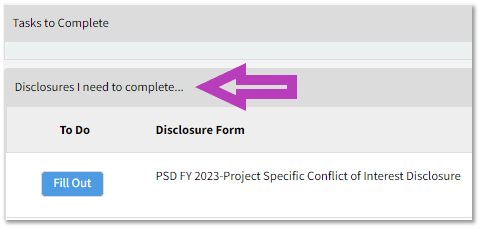
The Project Specific COI Disclosure is available for completion in COI Risk Manager. Once you log into the system, you will see a link for it on your home page and under the section labeled, “Disclosures I need to complete…” Select the “Fill Out” button beside the PSD and answer all questions.
Submitting subsequent PSDs, if applicable
The Project Specific COI Disclosure remains available for completion in COI Risk Manager. However, the disclosure is no longer available under the section labeled, “Disclosures I need to complete…” Instead, it is available on your home page under the section labeled, “SHOW DISCLOSURES AVAILABLE TO UPDATE.” Once you log into the system, select the down arrow to the right of the label.

Once you select the down arrow, you will see the subsequent version of the PSD.
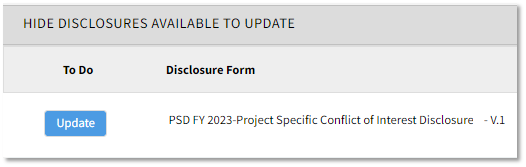
Select the “Update” button and follow these basic actions.
1. Update the following two (2) fields:
- eTRACS proposal number
- Project title
2. Ensure the box for “Select if you are Project PI” is selected or deselected, as appropriate. If you are not the Project PI and have ensured the box is deselected, go to the next step. If you are the Project PI and have selected the box, update the following field: Project sponsors
- The first row will default as the sponsor from your last PSD submission. Supposing your last submission had a sponsor of NIH, you would see the following:
-
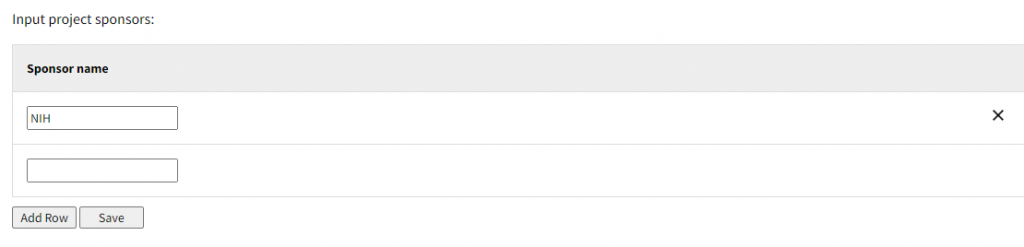
- You may either:
- Delete the text NIH, input the current project’s sponsor, and select Save, or
- Delete the first row by selecting the X to the far right-hand side, input the new sponsor in the remaining row, and press Save
3. Review all other questions and update responses, as necessary.
Questions and Issues
For questions and issues regarding completion of the Project Specific COI Disclosure, email us at coi.oric@ecu.edu. Please include ECU’s Proposal Number which is in the YY-NNNN format.